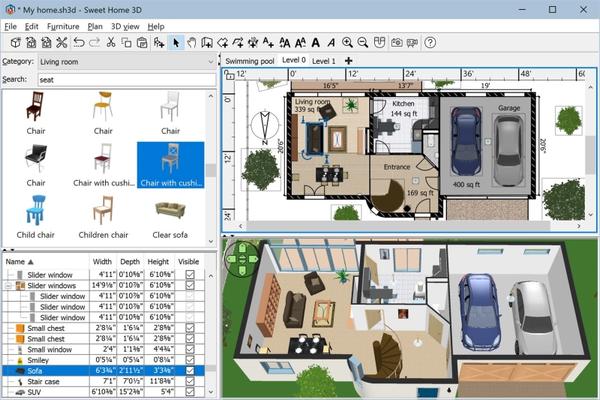
Sweet Home 3D is a interior design application that helps you place your furniture on a house 2D plan, with a 3D preview. There are many interior design software applications available on the market. I’ll present one of them to you now. Sweet Home 3D is the perfect tool to help you place furniture in your house. If you want to redecorate an apartment or rearrange the existing furniture in a room, Sweet Home 3D might prove to be the easiest way.
The application provides you with 75 furniture models that you can place in any room. They are organized into categories according to their placement in the house. You can create a custom plan that matches your house, respecting all room measurements and furniture details. And best of all, you can do all that for free! Sweet Home 3D is an open source project and offers many more pieces of furniture and entire house projects on the producer’s website.
You can create your custom rooms, specify the room dimensions, the wall thickness and texture, and pretty much any other detail that you might think of. The best feature of Sweet Home 3D, in my opinion, is the fact that you can enjoy a 3D preview of the house at any time.
Sweet Home 3D is the essential interior design app for creating detailed home plans and visualizing them in 3D.
– Design and Layout: Draw 2D layouts, add walls, doors, windows, and arrange furniture from a vast catalog. You can also import 3D models for complete customization.
– Perfect for Various Projects: Whether you’re planning a home renovation, decorating a room, or designing a new space from scratch, Sweet Home 3D provides the tools you need.
– Customization Options: Adjust colors, textures, and placements to create your ideal house design.
– Immersive 3D Experience: Real-time 3D rendering offers virtual tours and multiple viewing angles, including aerial and walk-through views.
– Compatibility and Export: Compatible with the desktop version, Sweet Home 3D allows you to export designs in PDF, PNG, SVG, and OBJ formats, perfect for sharing and editing.
– User-Friendly for All Levels: Ideal for both DIY enthusiasts and professionals, the app includes features like annotating room dimensions, adding labels, and exploring oor plans from various perspectives.
– Offline Accessibility: With no hidden fees and support for multiple languages, Sweet Home 3D works ofine, making it accessible anytime, anywhere.
Whether you’re remodeling, designing interiors, or decorating a new home, Sweet Home 3D makes it easy to visualize and bring your dream space to life!
Draw custom 2D oor plans across multiple levels.
Modify wall, floor, and ceiling textures and colors.
Access 10,000+ furniture items and 3D models.
Import custom 3D models for full design flexibility.
Adjust furniture dimensions, colors, and positioning.
View designs in 3D with aerial and visitor perspectives.
Create realistic images based on lighting and time of day.
Record video tours with a virtual path in 3D.
Export designs in PDF, PNG, JPEG, SVG, or OBJ formats.
Annotate plans with dimensions, labels, and markers.
Size (7z): 289 Mb